Subcategory Support for Partner and Distributor Offers
Enhanced Offer Organization and Filtering
We’ve introduced a new feature that allows Partners and Distributors to create and manage Subcategories for their offers in C3. This enhancement improves offer organization and makes it easier to categorize, search, and filter offers across multiple modules.
What’s New
-
Partners and Distributors can now create, edit, and delete Subcategories.
-
Subcategories can be linked to both new and existing partner/distributor offers.
-
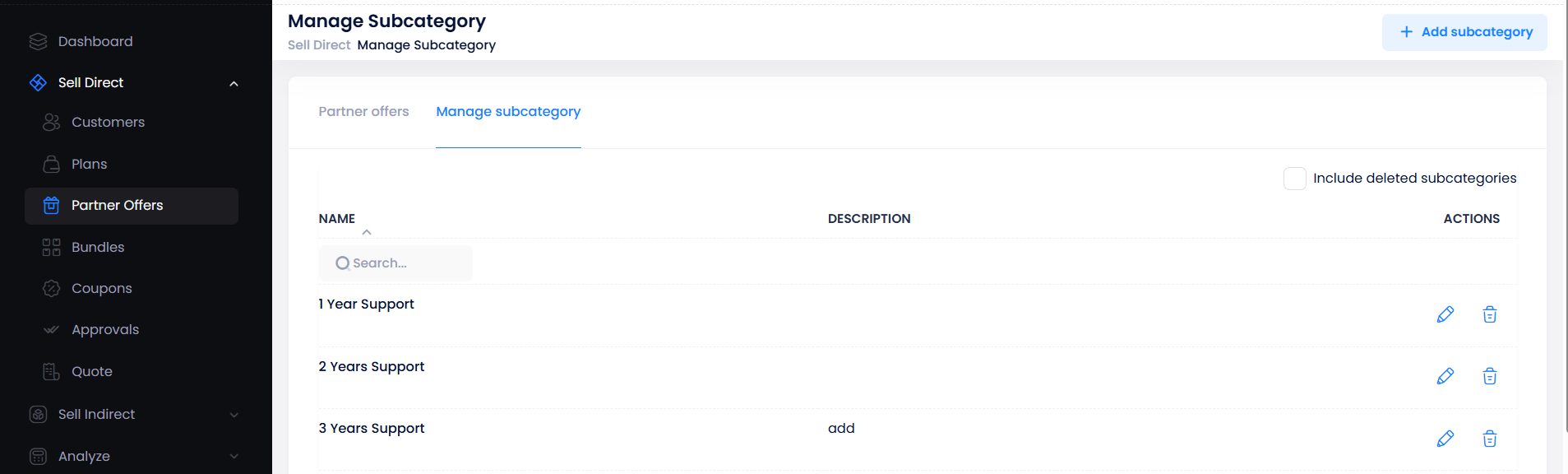
A new Manage Subcategory page has been added for better control:
- Navigation:
- Sell Direct → Partner Offers → Manage Subcategory
- Sell Indirect → Distributor Offers → Manage Subcategory
- Navigation:
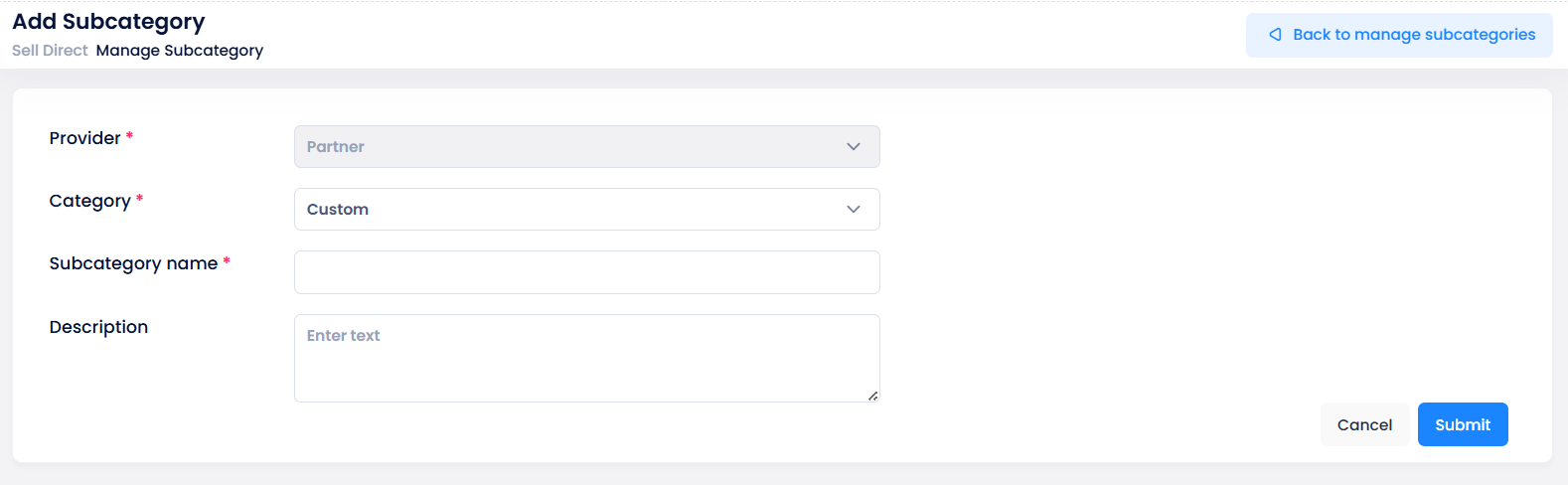
- Subcategory details include Provider, Category, Subcategory Name, and Description.
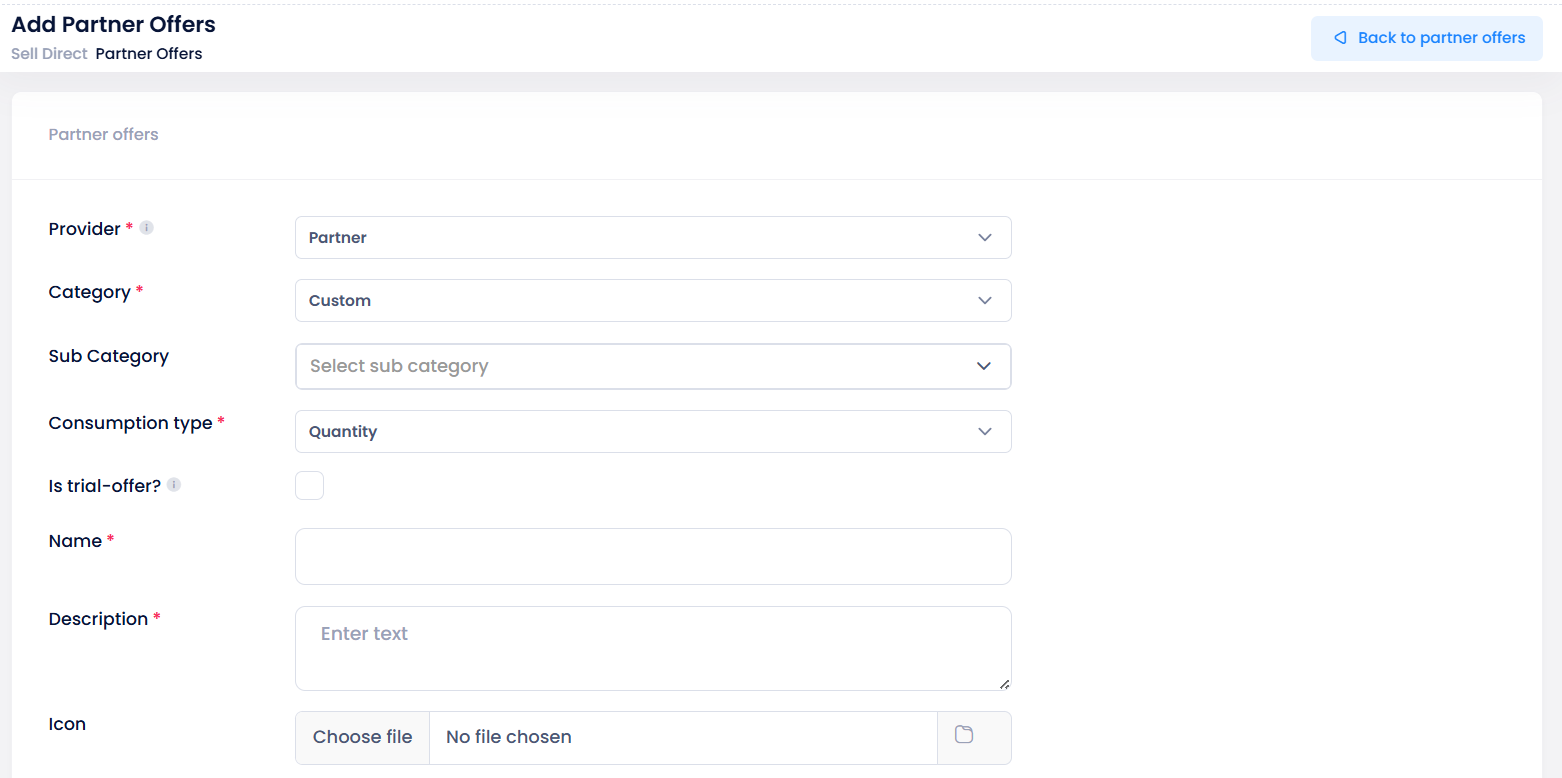
- Link Subcategory to Partner Offers
- Subcategories can be linked to new or existing Partner/Distributor Offers.
- In the Manage Offer screen, a new Subcategory dropdown allows users to select and associate an offer with an existing subcategory.
-
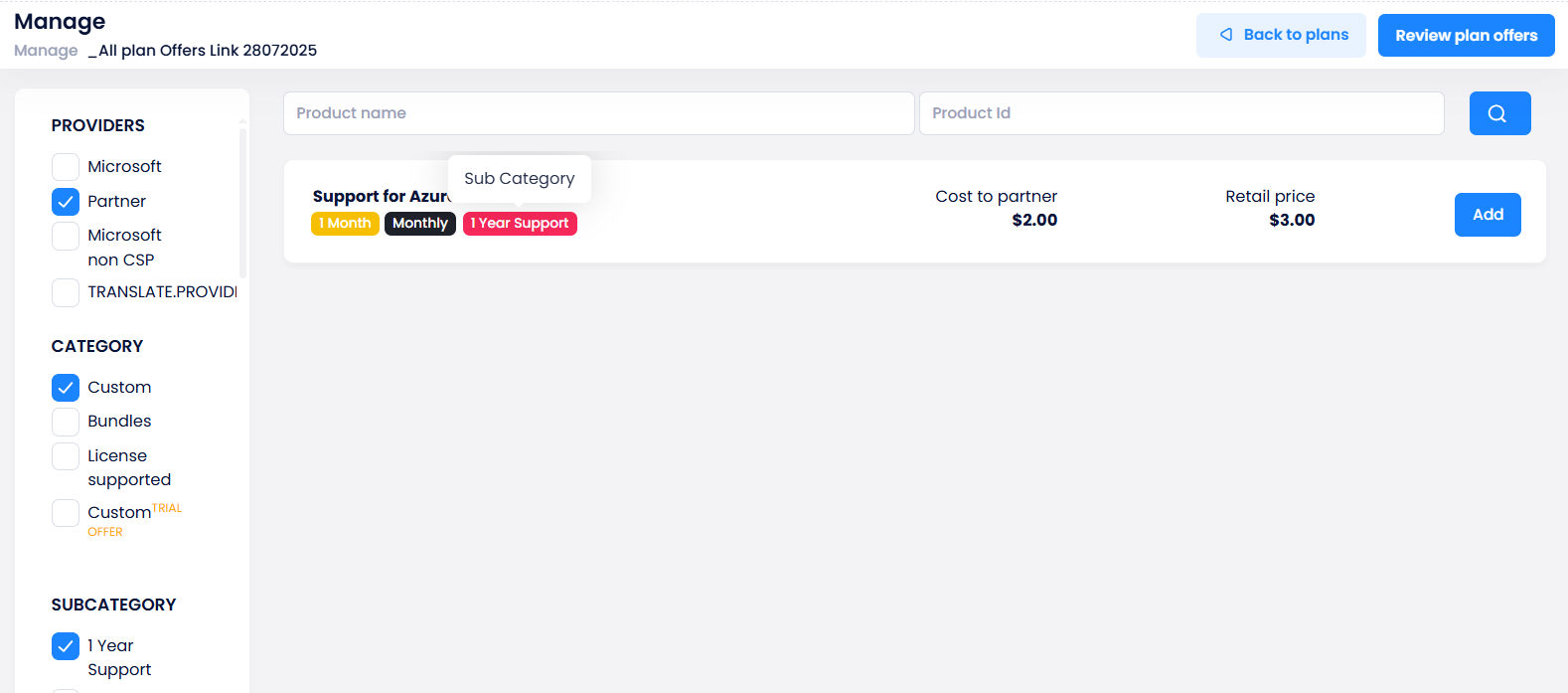
Subcategory pills and filters are now visible across multiple screens, including
- Partner Offer List, Product Catalogue, Shop, Cart, Orders, Plans, Renewal Manager, and License Summary.
Impact
- Better Organization: Helps partners and distributors group offers logically.
- Improved Usability: Enables easy search and filtering by subcategory.
Personalized Favourite Filters – User-Specific Configuration
Improved Reporting Experience with Individual Favourite Views
We’ve enhanced the Favourite Filter functionality in C3 to support user-specific personalization.
Previously, favourite filter preferences, such as selected columns in the Invoice Line-Item Report, were shared globally across all users. Now, each user can independently manage and retrieve their own favourite view without impacting others.
What’s New
-
Favourite column selections are now saved per user.
-
When users log in, the system automatically loads their personal favourite view.
-
Each user can modify, update, or reset their favourite columns independently.
-
Preferences persist across sessions, devices, and reloads, ensuring a consistent, personalized experience.
Impact
- Personalized Experience: Each user now enjoys a customized reporting view.
- Improved Usability: Prevents conflicts between different users’ preferences.
- Efficiency & Flexibility: Makes it easier for partners and resellers to tailor their Invoice Line Item Report views for faster analysis.
Introduction of Percentage on List Price Billing Type for Azure Plans
Enhanced Flexibility in Azure Plan Pricing with a New Billing Type
We’ve introduced a new billing type, Percentage on List Price, to provide partners with greater flexibility in configuring Azure Plan pricing. This new billing type allows a markup to be applied directly to Microsoft’s base cost (MS Cost), enabling more transparent and controlled margin management compared to the traditional Pay-As-You-Go cost structure.
What’s New
-
New Billing Type Added - A new option, Percentage on List Price, is now available under the Billing Type filter.

-
Existing Billing Type Renamed - The previous Percentage billing type has been renamed to Percentage on Retail Price across C3 (except in Reports & APIs).

-
Flexible Pricing for Azure Plans - Partners can now add and purchase Azure Plan products using the Percentage on List Price billing type.
-
Change Plan Support - Existing Azure Plan products with the old Percentage billing type can be switched to Percentage on List Price, and vice versa, using the Change Plan feature.
-
Validation Rule - Negative sale prices are not permitted for Azure Plan products using this billing type.
Usage and Billing Logic
- Calculation Formula:
Final Price = MS Cost + (MS Cost × Percentage)
Impact
-
Improved Pricing Control: Partners can apply markups directly on Microsoft’s cost for more accurate pricing strategies.
-
Simplified Plan Configuration: Easier management and switching between billing types.
-
Increased Transparency: Better visibility into Azure plan cost structures and profit margins.
Standardization of Naming Conventions for Azure Reports
Improved Alignment Between C3 and Azure Portal for Consistent Reporting
We’ve introduced a new configuration in C3 to align column names between the C3 Azure Consumption Reports and the Azure Portal, ensuring consistency and reducing confusion for partners reviewing Azure usage data.
What’s New
New application-level configuration, AzureReportingPCStandardization and AzureReportingPCStandardizationForAPI, has been added to standardize Azure report column names.
- Configuration Type: True/False
- Default Value: False
- Purpose: When set to True, all the columns listed below will be displayed using their corresponding alternative names as specified.
Column Renaming in C3 Reports
- Resource Group → Resource group name
- Resource Category → Meter category
- Resource Sub Category → Meter subcategory
- Resource Type → Meter
- Resource Name → Resource
Column Renaming in Azure Estimate API
-
API Endpoint:
- {{apiUrl}}/api/azureConsumption/v3/customer/{customerId}/page/{page}/startindex/{startIndex}/month/{month}/year/{year}/
-
Updated Columns:
- AzureResourceGroupName → ResourceGroupName
- AzureResourceCategory → MeterCategory
- AzureResourceSubCategory → MeterSubCategory
- AzureResourceType → Meter
- AzureResourceName → Resource
- MeterId → ResourceGuid
Impact
- Consistent Terminology: Aligns Azure report columns between C3 and the Azure Portal, reducing confusion.
- Improved Readability: Clear and familiar field names for users managing Azure data.
- Flexible Configuration: Partners can enable or disable standardization through a single configuration toggle.
Favourite Products on Price List
Highlight Key Offers for Quick Access in Shop and Public Signup
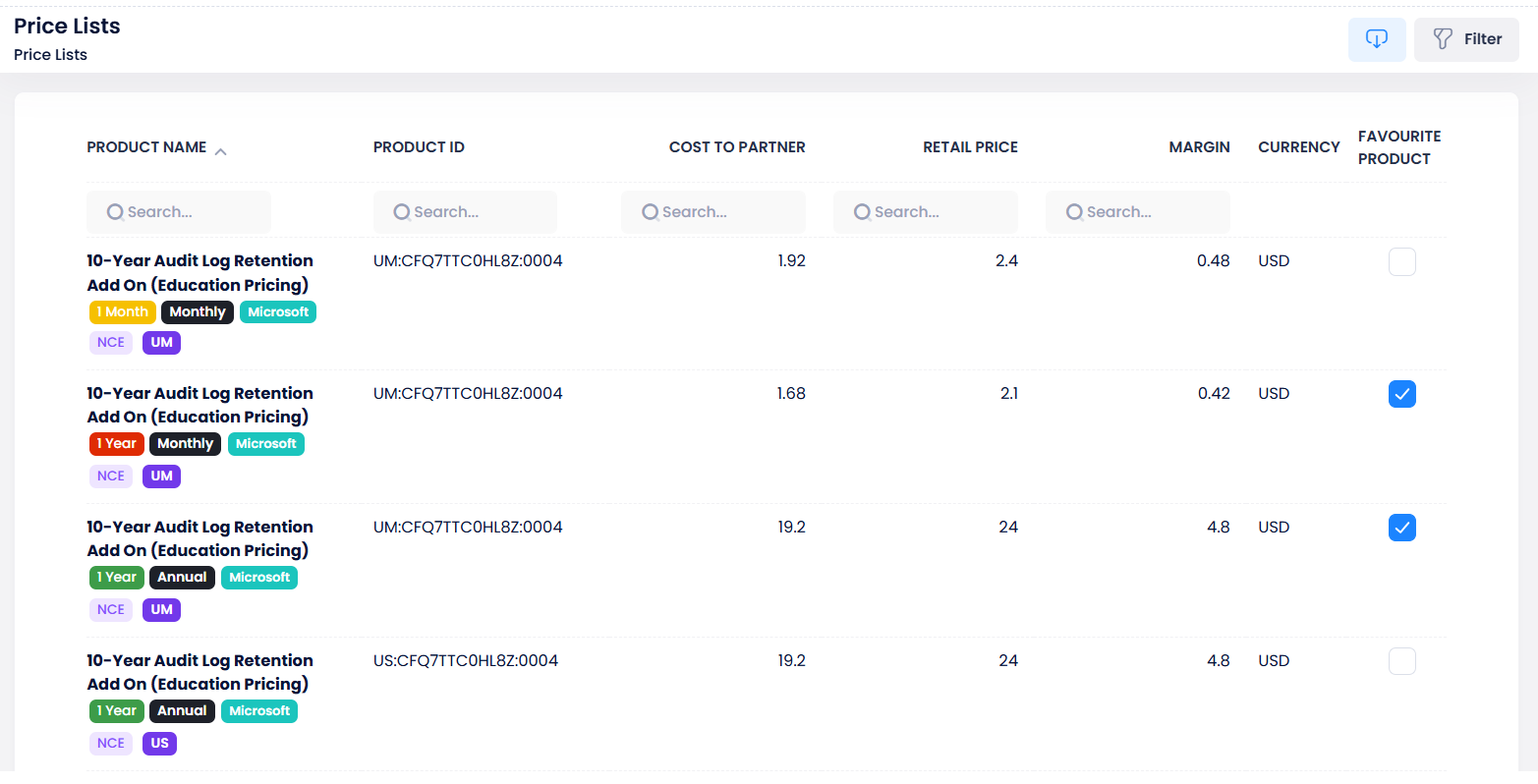
We’ve introduced a new option called Favourite Product on the Price Lists page, allowing partners and resellers to mark their most important offers as favourites.
This feature makes it easier to promote key products by displaying them at the top of the Shop and Public Signup pages, improving visibility and accessibility for customers.
What’s New
-
A new Favourite Product column with checkboxes has been added to the Price Lists page.
-
Partners and resellers can now select up to 10 products as favourites.
-
Favourited products appear at the top of the Shop page and Public Signup page, followed by all other offers in their default order.
Where You Can Use It
-
Price Lists: Select or view favourite products.
-
Shop Page: Favourite products appear first for customers during product browsing.
-
Public Signup: Favourite products are displayed first on public signup page.
One-Time Billing Enhancement – Improved Data Alignment
We’ve enhanced the One-Time Billing data in C3 by adding six additional attributes for improved consistency with Microsoft billing reports:
- CreditReasonCode
- SubscriptionStartDate
- SubscriptionEndDate
- ReferenceId
- ProductQualifiers
- ProductCategory
These fields are currently stored for future use and not yet visible in the UI.