Prerequisite Offer Display for NCE Add-ons
Ensure Required Base Products Are Selected When Purchasing Add-ons
We’ve introduced a new feature in C3 that ensures customers are aware of and can purchase the prerequisite base product required for an NCE add-on. Previously, customers attempting to purchase add-ons without the required base product would face a failed transaction. This enhancement streamlines the process and prevents purchase errors.
What’s New
-
Automatic Base Product Check:
- When a customer clicks Add to Cart for an NCE add-on product, the system verifies if the required base product is already purchased.
-
If Base Product Exists:
- The customer proceeds directly to the cart as usual.
-
If Base Product Is Missing:
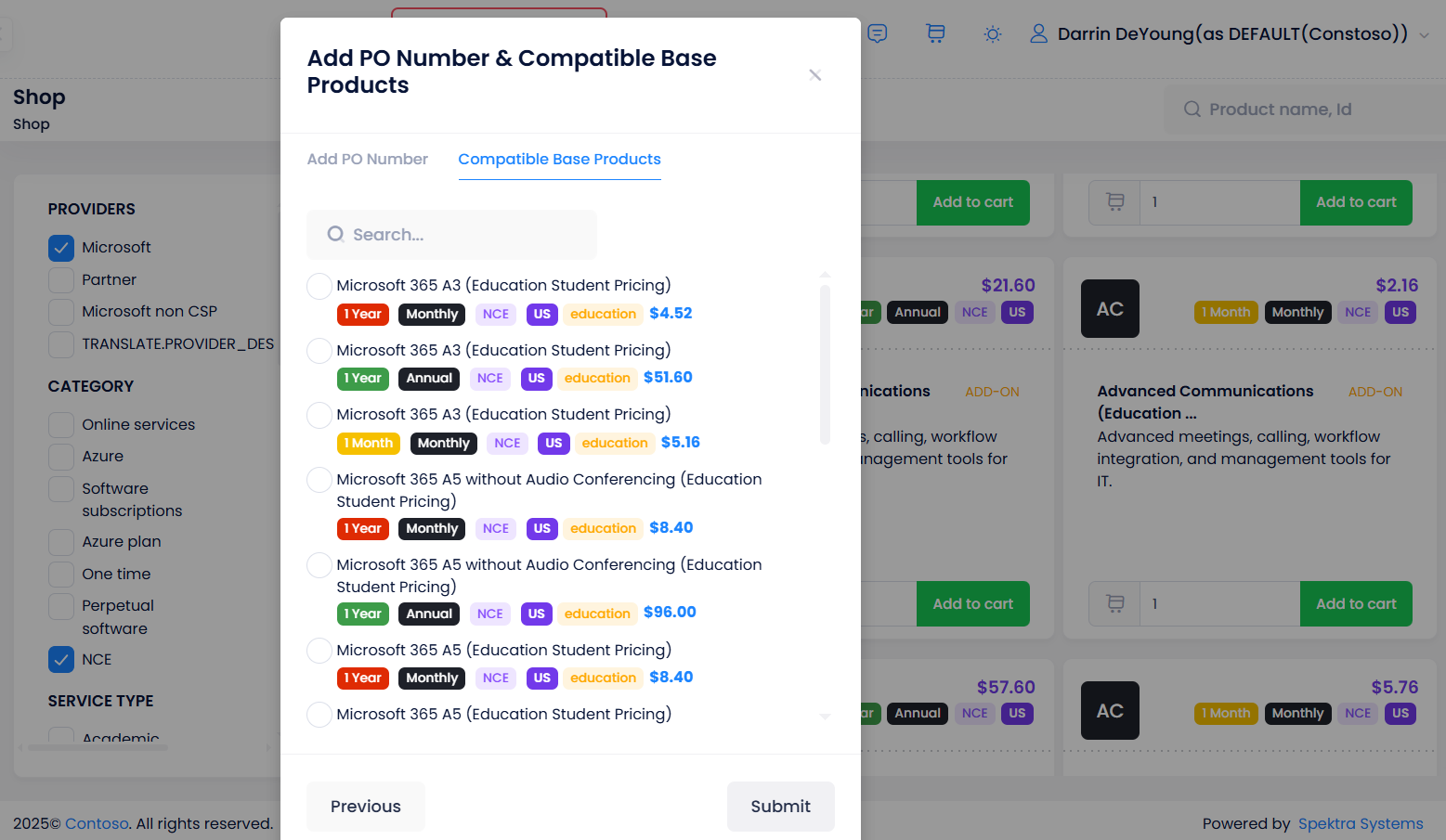
- A popup displays the list of eligible base products, shown with single-selection radio buttons.
- The customer can select one base product, and upon clicking Submit, both the add-on and the chosen base product are added to the cart.
Impact
-
Reduced Purchase Errors: Customers are guided to add the required base product, preventing failed transactions.
-
Simplified Checkout Experience: Add-on and prerequisite base product can be added to the cart in a single step.
-
Increased Clarity: Customers are clearly shown what base product is required before proceeding.
Multiple Billing Profiles for Partners
Flexibility to Manage and Assign Different Billing Addresses Across C3
We’ve introduced a new feature that allows partners to manage and use multiple billing addresses in C3. Previously, only one billing address was available, and it was applied by default for all customers and resellers. With this enhancement, partners can now configure and assign different billing profiles for invoicing and quoting, improving flexibility and accuracy in financial documents.
What’s New
-
Organization Profile
- Add and manage multiple addresses, phone numbers, and email IDs in one place.
- Set a default billing address for customers, resellers, invoices, and quotes.
-
Customers and Resellers
-
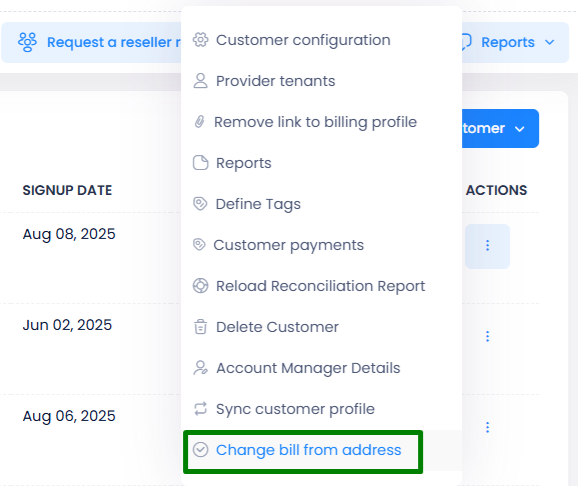
New option Change Bill From Address available in customer and reseller settings.
-
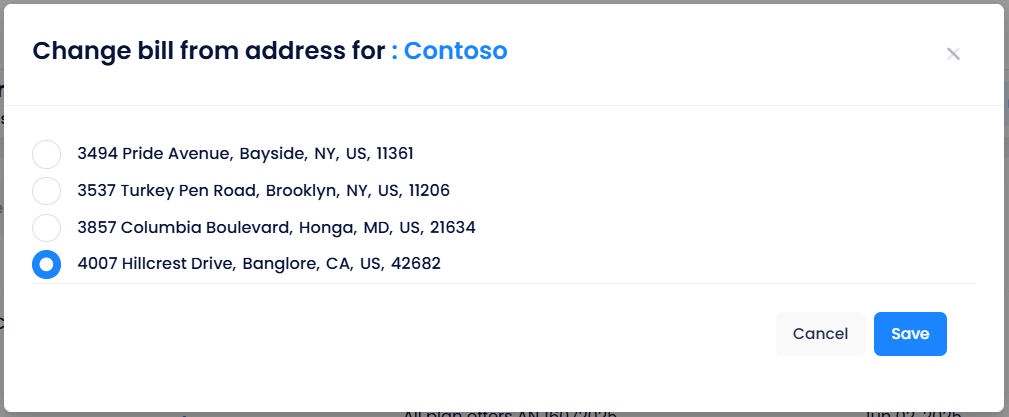
Select from the list of available addresses; the chosen one becomes the default for that customer/reseller.
-
-
Invoices
- New edit option in the Bill From section allows partners to change the billing address until the invoice is finalized.
- Two options available:
- Update for the current invoice only.
- Update for the current invoice and set as default.
-
Quotes
- In Quote > Seller Info, partners can edit the billing address using the new Bill From Address popup.
- Two options available:
- Update for the current quote only.
- Update for the current quote and set as default.
Impact
- Greater Flexibility: Partners can manage multiple billing profiles for different customers and resellers.
- Improved Accuracy: Ensure invoices and quotes reflect the correct billing entity.
New Macro: Apply X% ERP on List Price
Smarter Margin-Based Pricing for Greater Flexibility
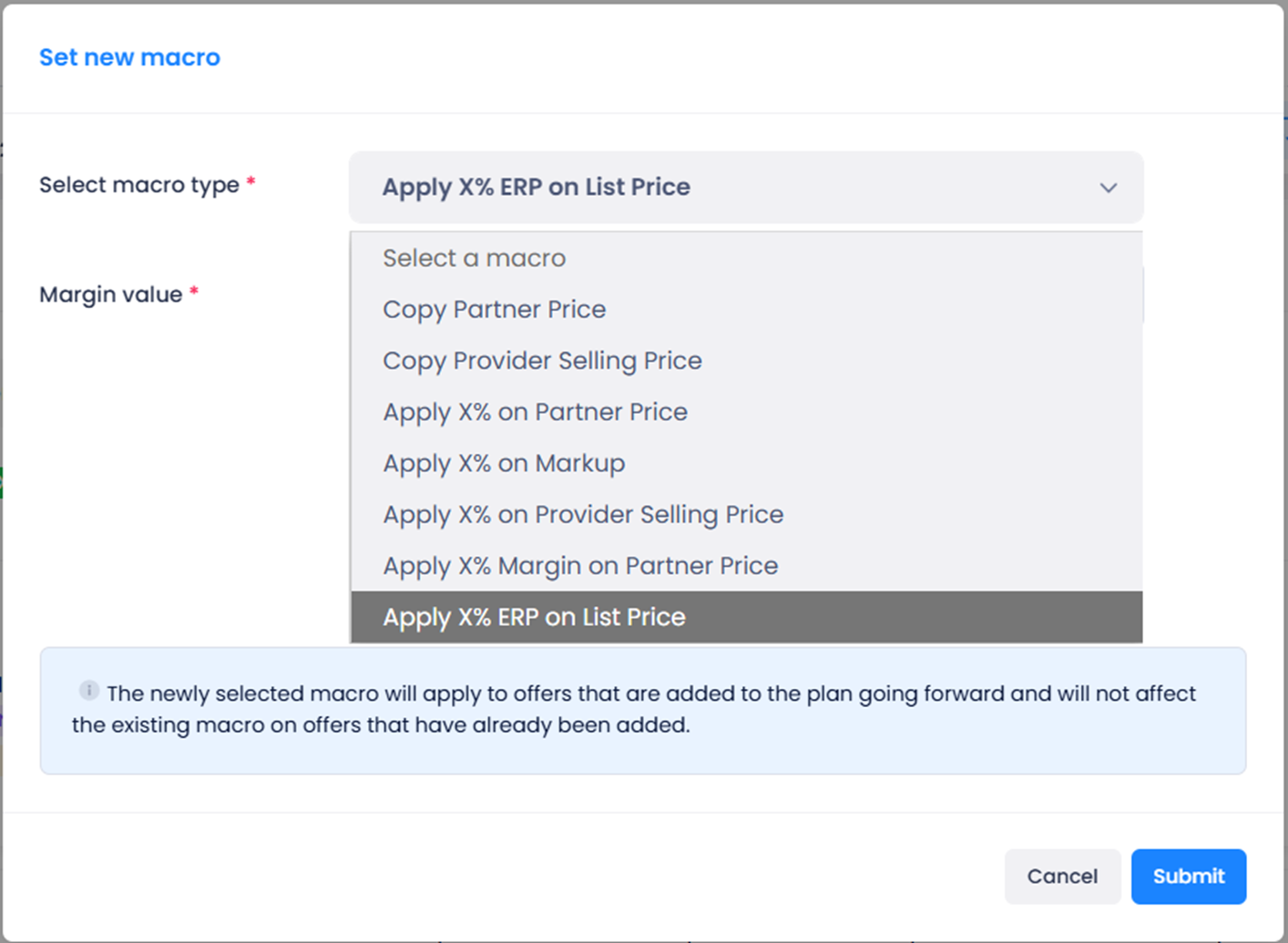
We’re introducing a new pricing macro in C3, Apply X% ERP on List Price, to help partners and resellers configure sale prices more intelligently and consistently. This enhancement enables margin-based calculations that balance profitability and competitive pricing.
What’s New
The macro first calculates the margin percentage using the formula:
-
The macro first calculates the margin percentage using the formula:
Margin% = ((Retail Price – Cost to Partner) / Retail Price) * 100 -
If the margin percentage is less than X (the value entered in the macro), then:
Sale Price = Cost to Partner -
Otherwise, the sale price is calculated as:
Sale Price = ((X * Retail Price) / 100) + Cost to Partner
Where You Can Use It
- Customer Plans
- Reseller Plans
Impact
- Smarter Automation: Save time by reducing manual price configuration.
- Scalable Strategy: Apply consistent pricing logic across customers and resellers.
- Profit Protection: Ensure margins are preserved while remaining competitive.
Scheduled Reports Enhancement – GDAP Expiration Notification
Proactive Alerts for Expiring GDAP Relationships
We’ve enhanced Scheduled Reports in C3 to include a GDAP Expiration Notification.
Previously, partners had no option to retrieve a list of GDAP relationships nearing expiration. With this update, the scheduled reports will automatically include details of GDAP relationships set to expire within the next 30 days, ensuring partners stay informed and can take timely action.
Impact
- Proactive Monitoring: Get advance visibility into GDAP relationships nearing expiry.
- Improved Partner Readiness: Take timely steps to renew or re-establish expiring relationships.
- Automation: Expiration details are included directly in scheduled report deliveries, removing the need for manual checks.
User List Export Enhancement
More Complete and Actionable User Data Now Available in Exports
We’ve expanded the User List Export feature in C3 to provide partners with a more comprehensive dataset. Previously, exports contained only basic identifiers such as email and assigned licenses. With this enhancement, partners can now access additional user details to reduce manual work and improve reporting accuracy.
What’s New
-
Additional Columns in CSV Export:
- First Name – Individual user’s given name.
- Last Name – User’s surname (blank if not available).
- User Name – System login/identifier.
- Full Name – Combined first and last name for convenience.
Download Customers and Reseller Customers via API
Enhanced API Support for Fetching Direct and Indirect Customers
We’ve extended the** Active Customers API** to give partners more visibility into both direct and indirect customers.
Previously, partners could only retrieve their direct customers, while resellers could fetch only their own customers. With this enhancement, partners can now fetch both direct and reseller (indirect) customers in a single call.
What’s New
- A new parameter includeResellerContext has been added to the existing API:
{{apiUrl}}/api/activecustomers/details?includeResellerContext=true
- For Partners:
- Returns the list of direct and indirect customers.
- Indirect customers include the associated Reseller name.
- For Resellers:
- Returns only their own customers (no change to existing behavior).
Sites and Department Description in Invoice API
Enhanced Visibility of Site and Department Details in Invoice Data
We’ve updated the Get Invoices by Billing Period and Selected Customers/Resellers API to include additional properties for improved reporting and transparency.
What’s New
-
New Properties Introduced in the API response:
- SiteDescription – Displays the description of the Site for which the product is assigned.
- DepartmentDescription – Displays the description of the Department for which the product is assigned.
-
Endpoint Updated:
{{apiUrl}}/api/invoices/Download/v3/billingperiods/ -
RBAC Prerequisite:
These properties will be available only if the following RBAC functions are enabled:- SHOW_SITE_NAME_IN_API
- SHOW_DEPARTMENT_NAME_IN_API